What Is Comment Spam?

Photo by arndog
You may have noticed very weird comments appearing on your blog. The comments usually don’t make sense and they link to bizzare domain names. These comments are probably spam left by people (or automated spam bots) in an attempt to increase the target domains visibility on the search engines.
Why Do People Commit Comment Spam?
In one word links. Every comment on a blog creates a a link back to the target blog. The game is to create as many links back to a site as possible in an attempt to improve organic rankings on search engines. This is a black hat SEO technique.
What Do Links Mean?
It sounds like a game show host’s catch phrase, what do links mean? (audience reply) Google Juice! One of the measures of a site to improves it’s position on the search engines is the number of links it has from other sites.
How Much Of A Problem is It?
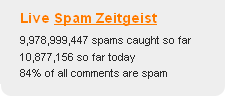
The numbers are huge, a picture tells a thousand words, so see this screen from Akismet (more about this later).
How To Spot Comment Spam
It is usually very easy to spot comment spam, the comment usually is meaningless or off topic, the domain names will be random connections of letters or look very suspect.
What Can You Do About It
As always if there is a problem in WordPress, there is a plugin to solve it. In this case my preffered anti spam plugin is Askimet.
This excellent little plugin analyses all comments left on your blog and any suspect ones are quarantined in a holding area to be deleted (automatically after 30 days if you configure it so) or to be marked as not spam (or ham as it is know).
The system reports back to a central database so the spam engine is always adapting to new methods of spamming.
Review Your Commenting Configuration
Another way to control comment spam is to ensure you control who can comment and how.
From your WordPress dashboard review settings -> discussion
Review these configurations and tighten these controls if you are suffering from a lot of comment spam.
Conclusion
If 80% of comments left on blogs are spam, there is a huge problem which must be helping sites gain traction on the search engines. Help to can the spam by installing pluigns such as Akisment and delete all spam on site.